1530 RGB Colours – Grid – White
£0.00
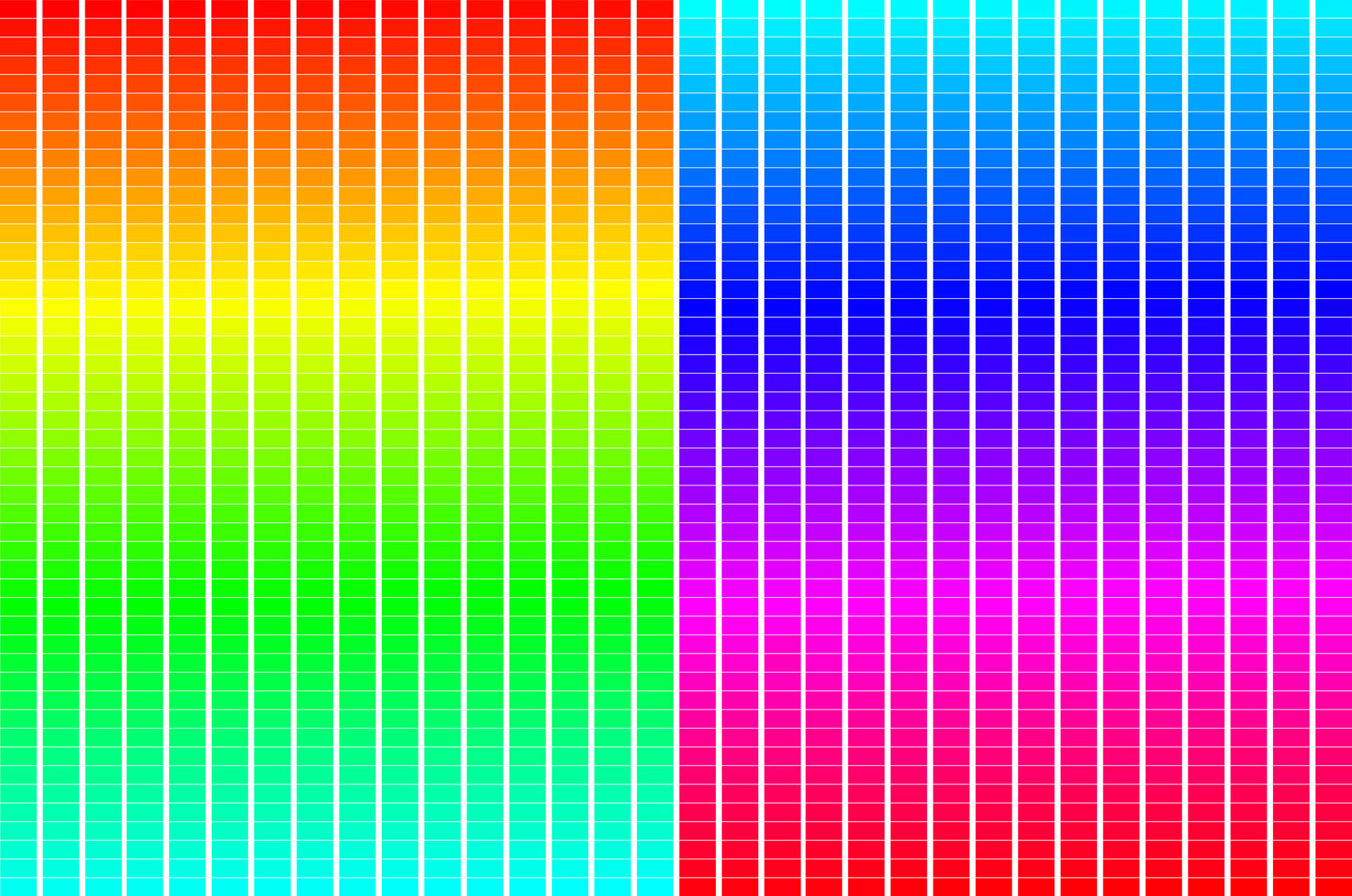
This diagram shows all 1530 fully saturated colours in the RGB colour model.
The diagram splits the total of 1530 into blocks of 256 colours with each block starting with a primary and finishing with a secondary colour or visa-vera. The six segments are:
- Red (primary colour) to yellow (secondary colour)
- Yellow (secondary) to green (primary)
- Green (primary) to cyan (secondary)
- Cyan (secondary) to blue (primary)
- Blue (primary) to magenta (secondary)
- Magenta (secondary) to red (primary)
Description
1530 RGB Colours - Grid - White
TRY SOME QUICK QUESTIONS AND ANSWERS TO GET STARTED
About the diagram
This diagram shows all 1530 fully saturated colours in the RGB colour model.
The diagram splits the total of 1530 into blocks of 256 colours with each block starting with a primary and finishing with a secondary colour or visa-versa. The six segments are:
- Red (primary colour) to yellow (secondary colour)
- Yellow (secondary) to green (primary)
- Green (primary) to cyan (secondary)
- Cyan (secondary) to blue (primary)
- Blue (primary) to magenta (secondary)
- Magenta (secondary) to red (primary)
Understanding the diagram
- All the colours in this diagram have been produced by mixing pairs of primary colours. The third primary colour in any swatch is set to zero – off.
- The diagram is made up of six blocks each made up of 16 rows and 16 columns.
- The first block starts with red and ends with yellow. The second starts with yellow and ends with green.
- So yellow appears twice, once at the end and then again at the beginning of the next block.
- This arrangement repeats through the diagram so there are a total of 1536 swatches but a total of 1530 different colours.
- To make sense of the overall relationship of colours, it helps to understand how RGB colour notation works:
- When mixing any RGB colour, three numbers (separated by commas) show how much red, green and blue light is to be used.
- The minimum value for each light source is 0. In this case the light is fully off.
- The maximum value for each light source is 255. In this case the light source is fully on.
- As each number increases so does the intensity of the corresponding light but the wavelength, and so the colour we see, stays the same.
| RGB colour values |
|||||
| Light source | Red | Green | Blue | ||
| Maximum value for each light source (fully on) | 255 | , | 255 | , | 255 |
| Values between 0 and 255 | 1 to 254 | 1 to 254 | 1 to 254 | ||
| Minimum value for each light source (fully off) | 0 | , | 0 | , | 0 |
RGB colour values
Now let’s look at RGB colour values in detail
RGB colour values are represented by decimal triplets (base 10) or hexadecimal triplets (base 16). These triplets are used in software and apps to select a colour.
- In decimal notation, an RGB triplet is used to represent the values of red, then green, then blue.
- Decimal numbers between 0 and 255 are selected for each value:
- Red = 255, 00, 00
- Yellow = 255, 255, 00
- Green = 00, 255, 00
- Cyan = 00, 255, 255
- Blue = 00, 00, 255
- Magenta = 255, 00, 255
- In hexadecimal notation, an RGB triplet is used to represent the value of red, then green, then blue.
- Hexadecimal numbers between 00 and FF are selected for each value.
- The hash symbol (#) is used to indicate hex notation:
- Red = #FF0000
- Yellow = #FFFF00
- Green = #00FF00
- Cyan = 00FFFF
- Blue = #0000FF
- Magenta = #FF00FF
- The sequence of hexadecimal values between 1 and 16 are: 0,1,2,3,4,5,6,7,8,9,A,B,C,D,E and F.
- The sequence of hexadecimal values between 17 and 32 are: 10,11,12,13,14,15,16,17,18,19,1A,1B,1C,1D,1E and 1F.
Some key terms
Diagrams are free to download
Related products
-

Overlapping Beams of R & G Make Yellow
£0.00 Select options This product has multiple variants. The options may be chosen on the product page -
Spectral Colour & the RGB Colour Model
£0.00 Select options This product has multiple variants. The options may be chosen on the product page -
Why an Object Appears Magenta
£0.00 Select options This product has multiple variants. The options may be chosen on the product page